Excel Preview
Displays the selected table and the visual states produced by comparison.
Documentation
A visual guide to how Deliverable Checker connects structured Excel reference data with PDF checker regions and native DWG attributes, then brings the comparison into one review workflow.
Getting Started
Deliverable Checker is a Windows desktop QA/QC application for validating information across engineering deliverables. Excel provides the structured expected values; PDF drawings are read through visual checker regions, while DWG layouts are read through block attributes and property mappings.
Project Files
A .delck file stores the application configuration: Excel source settings, PDF checker geometry, DWG references and mappings, comparison options and interface state. Values that originate in drawings are read again from the external PDF and DWG files whenever the project is loaded or processed.
Reconnect the Excel, PDF or DWG source at its new location. The saved rules remain in the project and the drawing-derived values are refreshed from the reconnected file.
Reload or update the source before comparison. This prevents previously extracted values from being treated as current drawing data.
Excel Configuration
The Excel workspace is configured by selecting the workbook, worksheet and table range. The lookup property identifies the Excel column used to locate the correct row for each deliverable, while constant properties can provide reusable expected values outside the selected table.
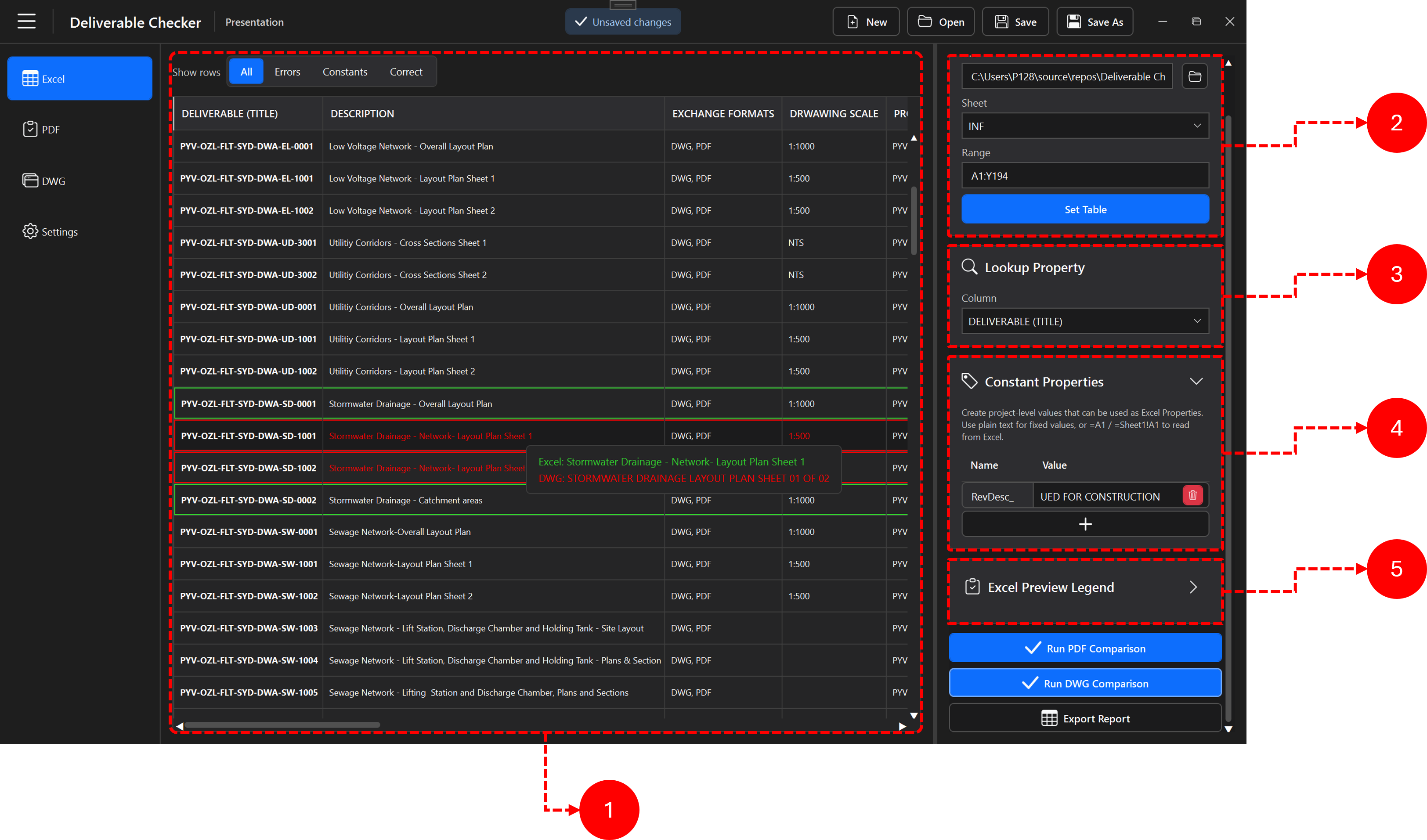
Displays the selected table and the visual states produced by comparison.
Selects the Excel file, worksheet and table range used by the project.
Defines the column used to match each PDF or DWG deliverable with its Excel row.
Creates reusable expected values that can be mapped like Excel properties even when they do not come directly from a table column.
Explains the visual states used in the preview so correct values, errors, constants and other comparison states can be distinguished.
The mapping image below is not explaining the meaning of the spreadsheet data. It shows what each numbered annotation is selecting or identifying between the application and the source workbook.
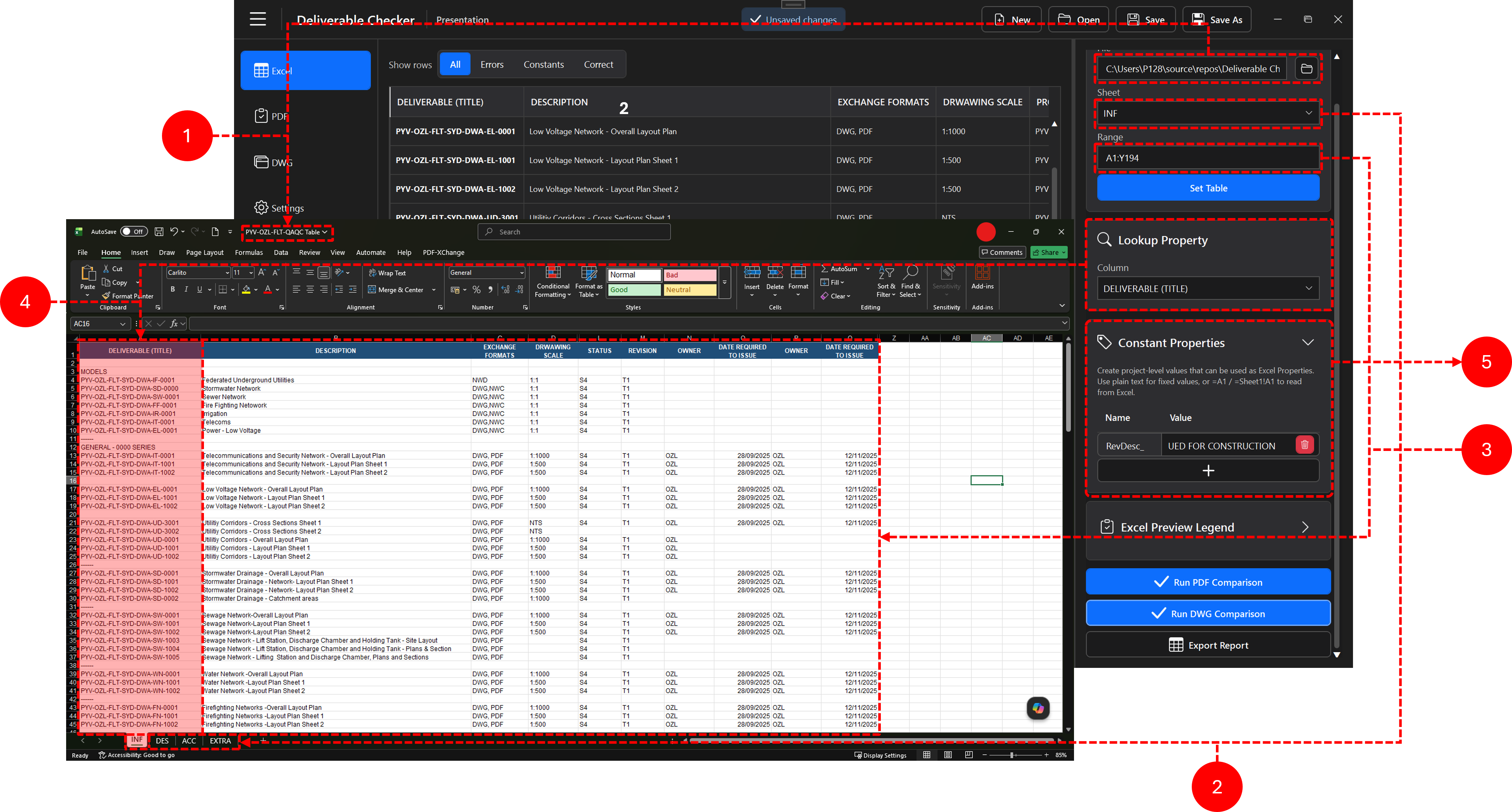
Identifies the table preview loaded inside Deliverable Checker. This is the application-side representation of the selected Excel source.
Links the application's Sheet setting to the workbook tab. The selected worksheet is INF.
Defines the rectangular table area read by Deliverable Checker. The example range is A1:Y194, so the cells inside that interval are included in the source table.
Points to the source workbook itself. The workbook shown is PYV-OZL-FLT-QAQC Table; this represents the Excel file rather than an individual cell or column.
Shows the additional project-level reference values defined directly in the application. These values can be used like Excel properties without being tied to a specific table column.
PDF Workflow
The PDF workspace combines the active PDF preview, checker geometry and direct preview controls. A Master checker provides the lookup value used to find the matching Excel record, while Normal and Sequential checkers capture the properties that need validation.

Shows the active PDF, checker geometry and the floating controls used to create checkers and work with Boundary Boxes directly in the preview.
Adds, replaces, updates, removes and filters the PDFs included in the project.
Organizes Master, Normal and Sequential checkers and their tags.
Displays and edits the properties of the selected checker. The panel remains visible and empty when no checker is selected.
The mapping view shows which value captured from the PDF is connected to which Excel property in the matched row.
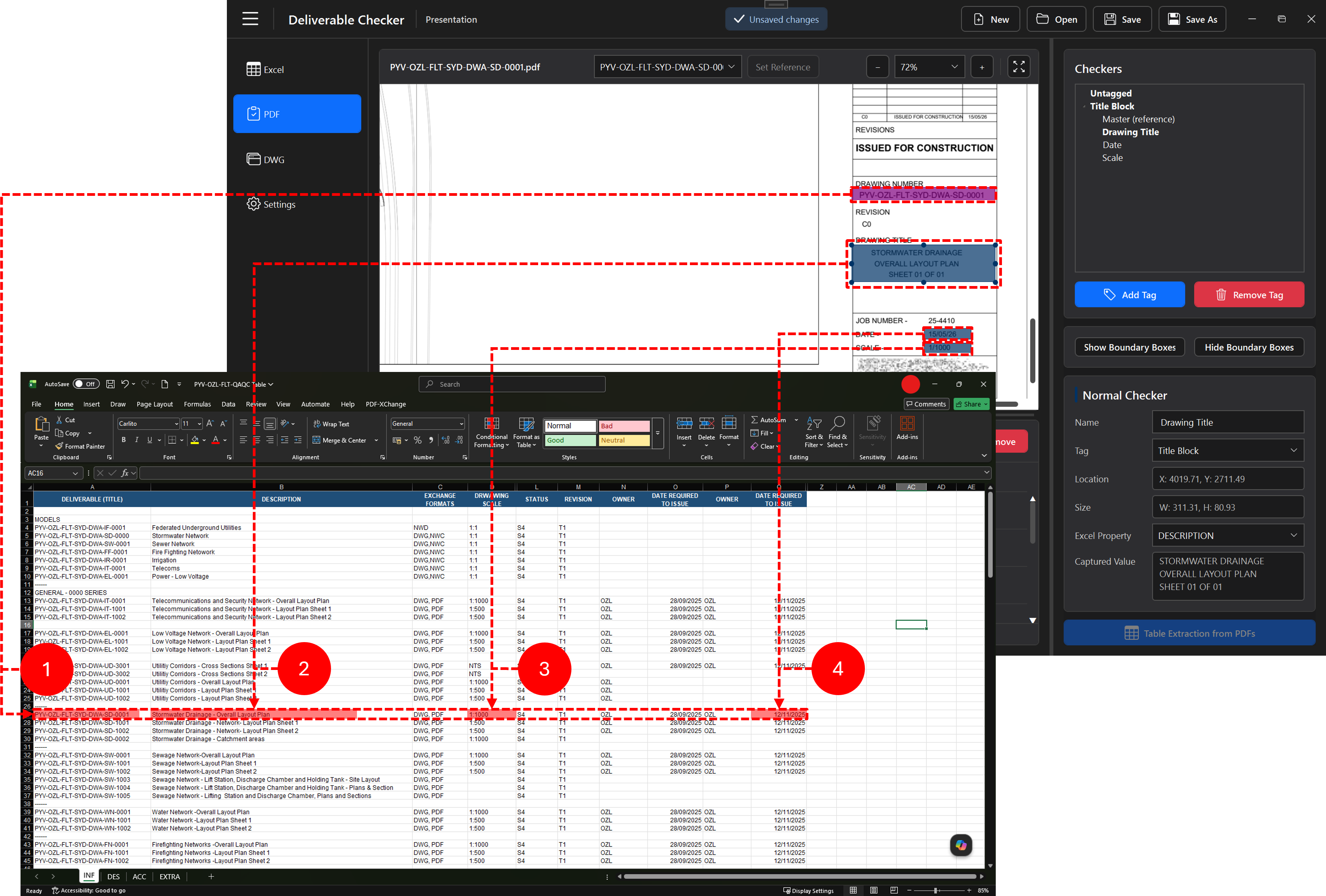
The PDF reference checker captures PYV-OZL-FLT-SYD-DWA-SD-0001. That value is matched against the Excel DELIVERABLE (TITLE) column to locate the correct row.
The Drawing Title checker captures STORMWATER DRAINAGE / OVERALL LAYOUT PLAN / SHEET 01 OF 01 and maps it to the Excel DESCRIPTION property. The corresponding row contains Stormwater Drainage - Overall Layout Plan.
The PDF scale value 1/1000 is mapped to the Excel DRAWING SCALE property, whose reference value in the highlighted row is 1:1000.
The checker over the PDF Date field captures 15/05/26 and maps it to the Excel DATE REQUIRED TO ISSUE property. The highlighted row shows 12/11/2025.
PDF Checkers
Captures the drawing reference used to find the matching Excel row.
Captures text inside one defined region and compares it with one expected property.
Uses multiple internal regions to capture and compare a structured sequence of values.
DWG Workflow
With AutoCAD installed, the DWG workspace reads paper-space layouts, blocks and attributes. A reference drawing establishes the layout and block pattern reused across the project before property mappings are configured.
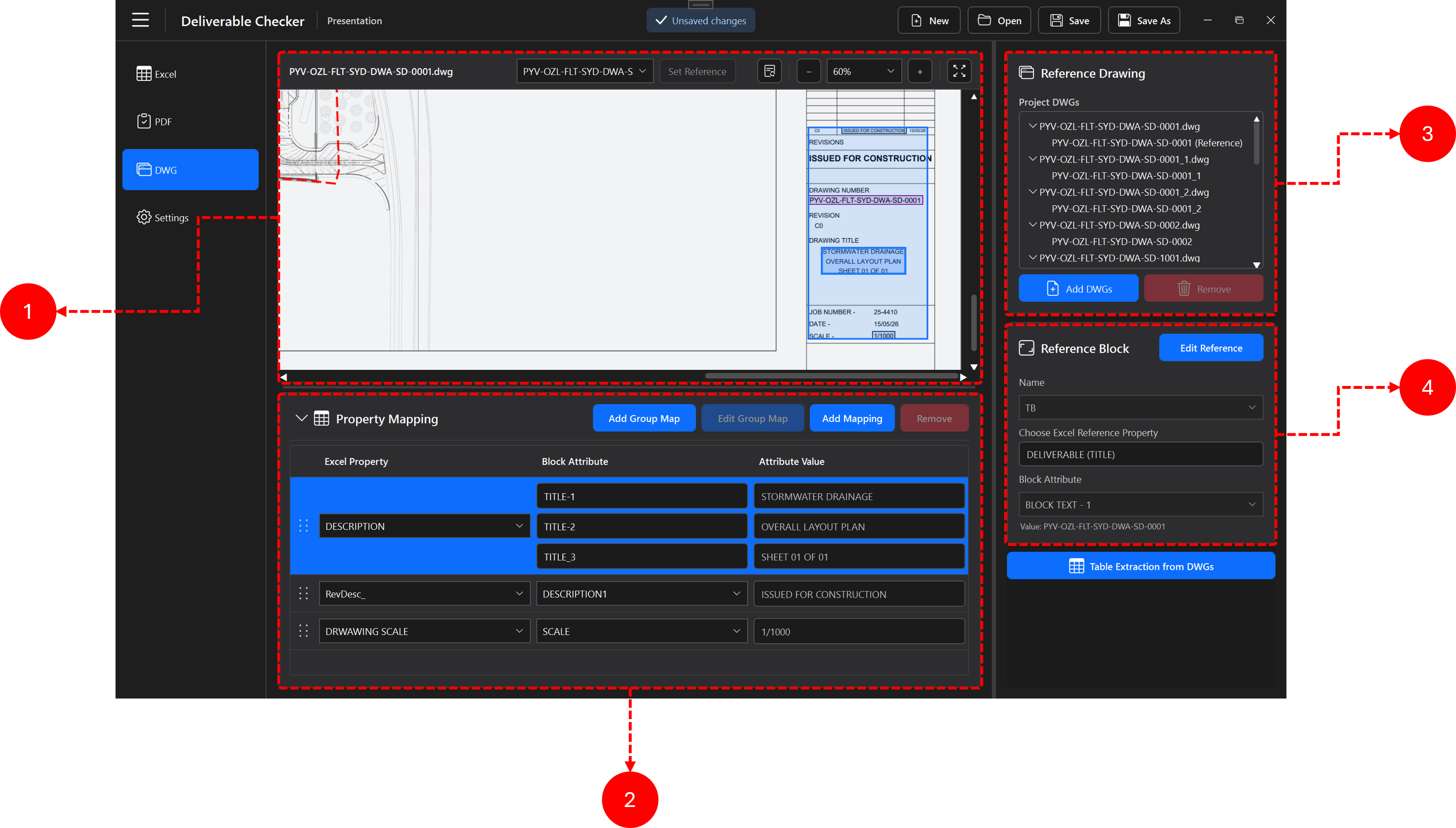
Displays the selected paper-space layout and title block so the reference drawing, block and attributes can be inspected visually.
Maps expected Excel or constant properties to individual or grouped block attributes and shows the extracted values.
Lists project DWGs and their layouts, identifies the active reference and provides controls to add or remove files. An unavailable reference may be removed, and a new DWG can be added from the empty central state when no drawings remain.
Defines the block and attribute used to identify each drawing, locate its Excel row and extract the mapped comparison values.
DWG Mapping
Property mappings define what is extracted from the configured reference block and which Excel or constant property each value represents. The image below shows the relationship between the DWG title block and the corresponding reference row.
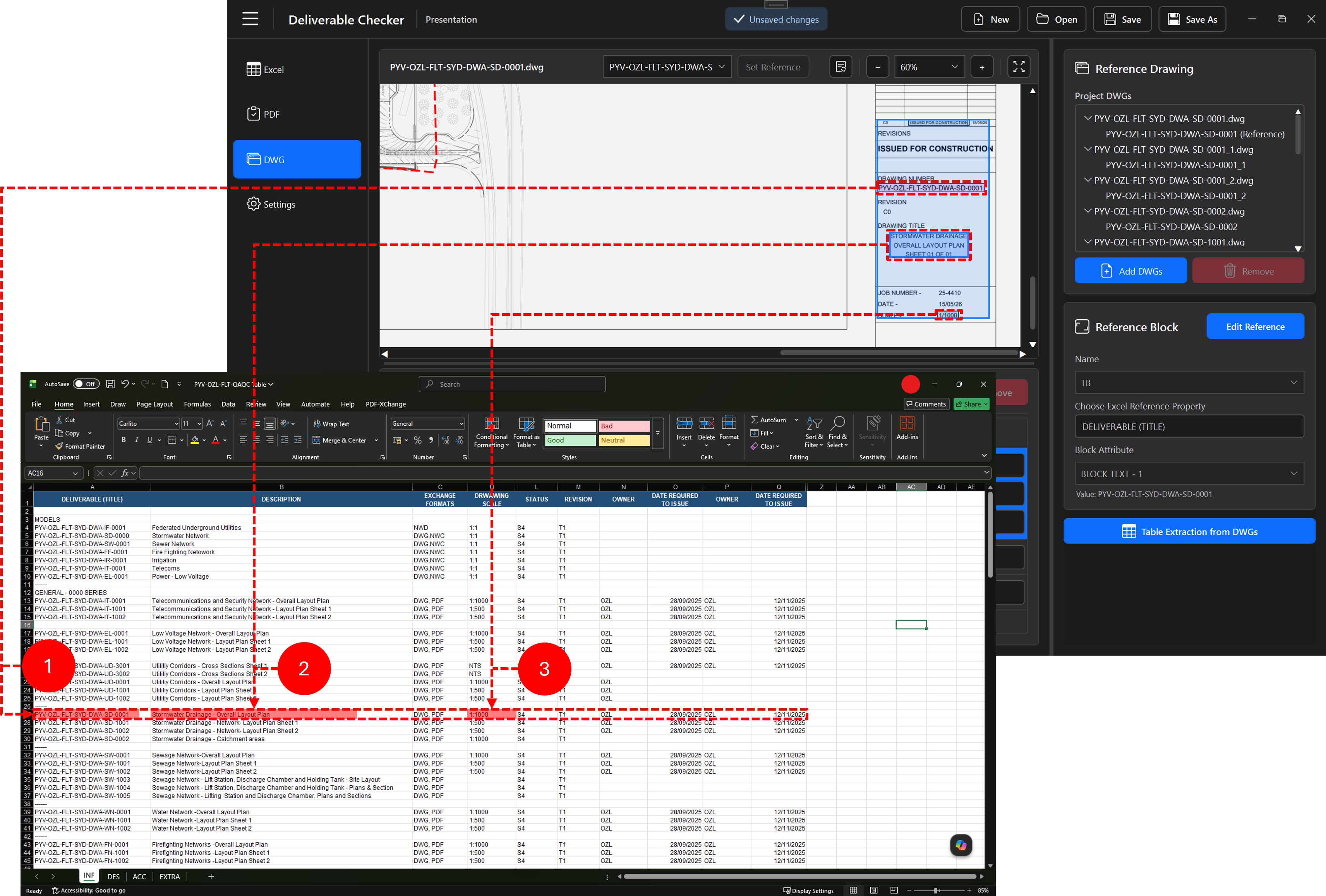
The reference block provides PYV-OZL-FLT-SYD-DWA-SD-0001. This is matched to the Excel DELIVERABLE (TITLE) value to identify the correct reference row.
The grouped DWG attributes TITLE-1, TITLE-2 and TITLE-3 provide STORMWATER DRAINAGE / OVERALL LAYOUT PLAN / SHEET 01 OF 01 and are mapped to the Excel DESCRIPTION property.
The DWG SCALE attribute contains 1/1000 and is mapped to the Excel DRAWING SCALE property, whose highlighted reference value is 1:1000.
Map one block attribute directly to an Excel or constant property.
Combine multiple block attributes into one mapped value using the configured separator and order.
Running Validation
Confirm PDFs, checker configuration and the Excel lookup property, then run the batch comparison.
Use Table Extraction from PDFs to save captured checker values as a structured XLSX table.
Extract mapped values from selected layouts and save the resulting rows to an XLSX workbook.
Compare the extracted layout data directly against the selected Excel reference row.
DWG processing reports progress per layout and supports cancellation while drawings are processed in the background.
Results & Reports
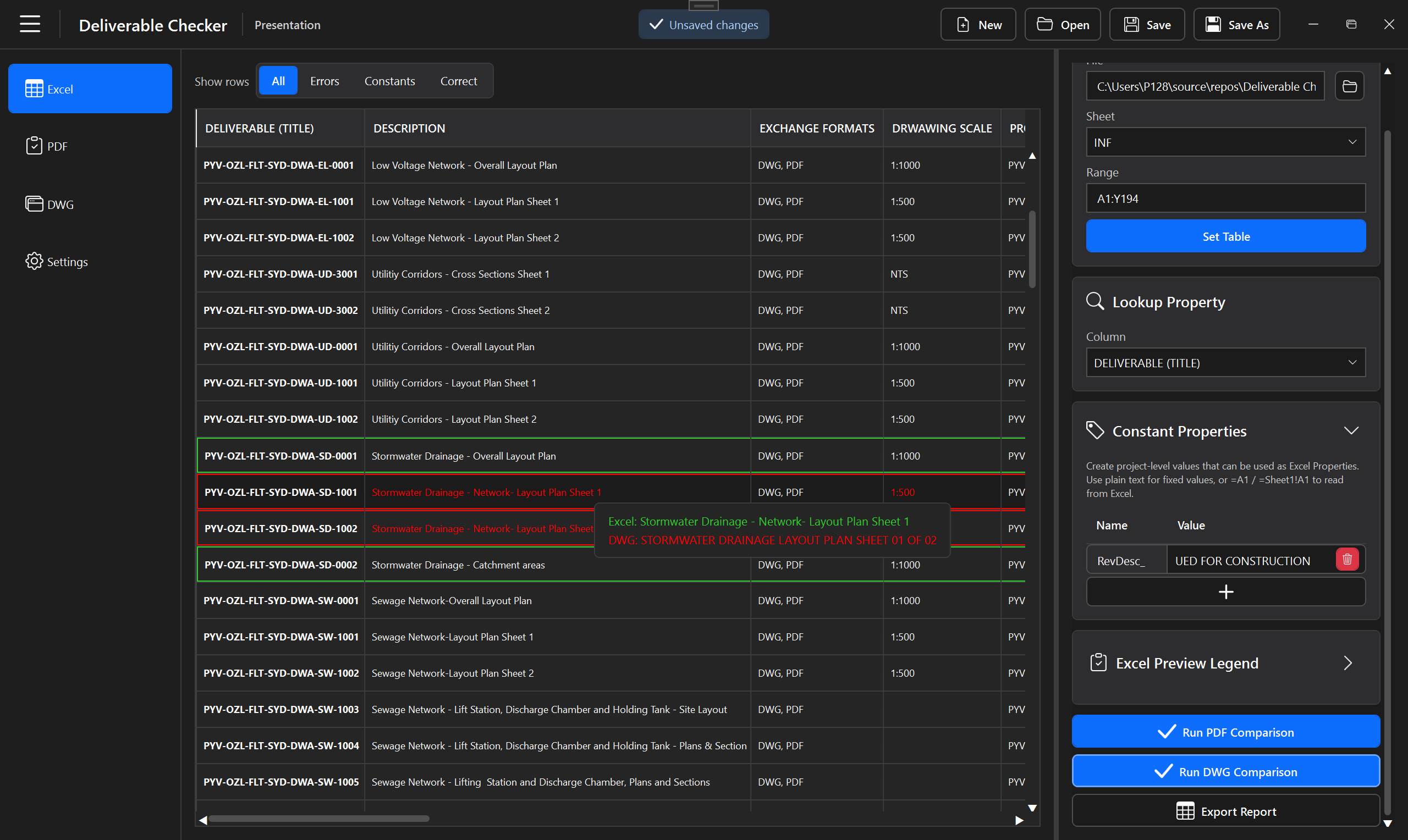
The results workspace consolidates validation output so reviewers can distinguish successful checks from mismatches, constant mismatches, missing references, duplicate references and processing failures. Use All, Errors, Constants or Correct to focus the preview, and hover a highlighted value to compare the expected and detected text.
Settings
The Settings workspace separates the most important reusable behaviors from the document workspaces.
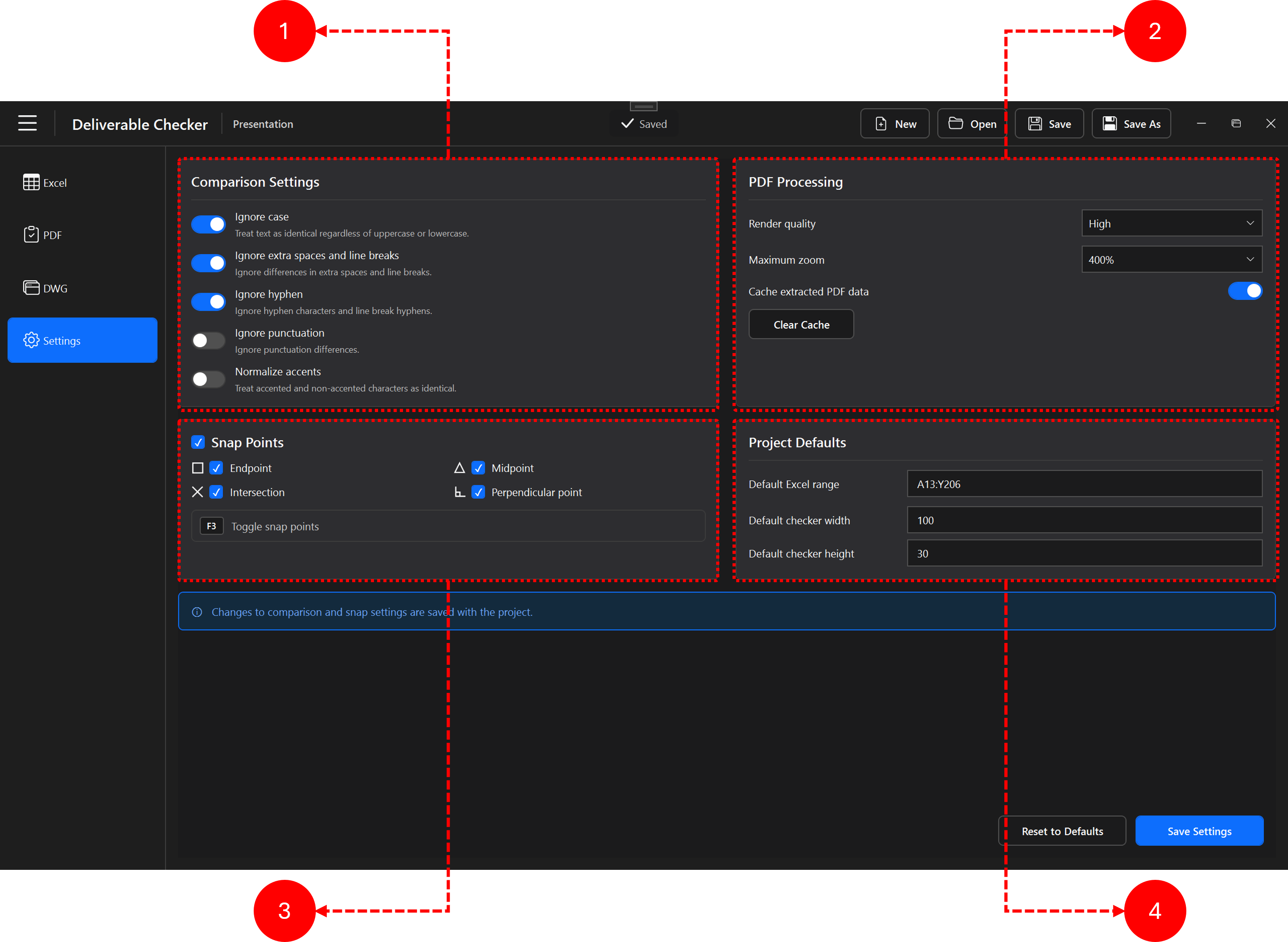
Controls text normalization before comparison, including case, extra spaces and line breaks, hyphens, punctuation and accent handling.
Controls PDF rendering quality, maximum zoom and caching of extracted PDF data.
Configures snapping used when placing and editing checker geometry. Endpoint, Midpoint, Intersection and Perpendicular point are available, with F3 used to toggle snapping.
Defines the initial Excel range and checker dimensions reused when a project is configured.
Installation
Download the latest installer from the project page, run the package and follow the installation prompts. One 64-bit installer is used for current 64-bit Windows systems.
Troubleshooting